An AI task manager for your Markdown notes.
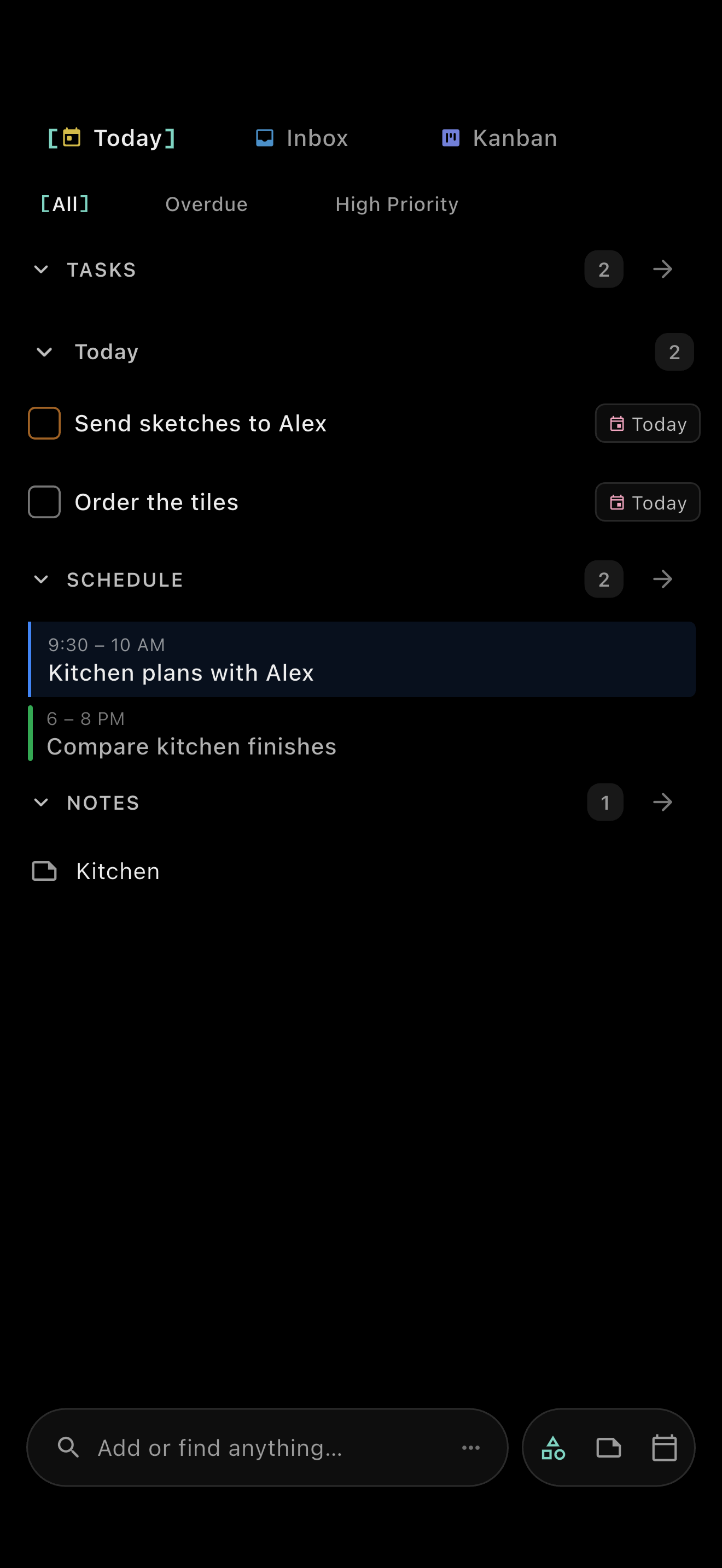
Your agent adds and updates tasks in Markdown. TaskForge lets you read and edit those tasks and notes, with your device calendar beside them. Bring your own agent; CLI and local MCP tools are available separately.


Free download. No account. Optional paid Premium.
Request summary: Add "Order the tiles" to Kitchen.md, due September 7, 2026.
- You
Remind me to order the tiles today.
- Agent
Added. Order the tiles is due today, in Kitchen.md.
Ask for one of these
Inspect the recorded run
The agent read Kitchen.md and inserted a task among the existing tasks. Here is the original English request, followed by a summary of its two tool calls and the resulting file.
Kitchen.md in this folder is my task list. Add a task titled "Order the tiles", due 2026-09-07, with the other tasks. Tasks are Markdown lines like "- [ ] Title 📅 YYYY-MM-DD". Change nothing else, then reply with the single word done. Read the file
Edit: - [ ] Order the tiles 📅 2026-09-07 2026-09-07 · 17:50 EDT · Claude Code 2.1.263 · claude-opus-5[1m] · 3 turns · 7.9 s · 270C57C0-D020-4717-AF04-713F96917015 (iOS 26.5) · 4e9f995c428ba1df4cf26da7a579041ec24e6fb3 · delivery=watcher
## The plan

Keep the oak shelves. Warm white walls, brushed steel handles.

## Before the next visit

- [ ] Send sketches to Alex ⏫ 📅 2026-09-07
- [x] Pick up paint samples 📅 2026-09-07 ✅ 2026-09-07
- [ ] Order the tiles 📅 2026-09-07

## Measurements & materials

North wall: **2.8 metres**. Allow 10% extra for tiles.
Bring the samples home before choosing a finish.

**Budget:** $1,800 for paint, tiles and lighting.
Open your agent's task list in TaskForge.
Read and edit the same tasks and notes, with your device calendar beside them. Free download. No account. Premium is optional: buy it once or subscribe.
A task manager for Claude Code and Cursor
Open your Markdown folder in Claude Code or Cursor. Ask the agent to read TaskForge/Settings/agents.md, then add or update a task using that folder's syntax. TaskForge reads the saved file on the same device. The setup guides explain how to point each tool at the instructions.
TaskForge is not affiliated with or endorsed by Anthropic (Claude Code) or Anysphere (Cursor).
An AI notes app for your Markdown folder.
Ask your agent to update a decision in your notes. TaskForge reads the saved Markdown. Here, the note tools added "Matte black taps." to the kitchen plan. The note tools check for changes since the last read and refuse an edit if that paragraph has changed.
- Keep the oak shelves. Warm white walls, brushed steel handles.
- Keep the oak shelves. Warm white walls, brushed steel handles. Matte black taps.
Recorded note edit, September 7, 2026. Original English paragraph.
How the note edit was checked
This edit used the note's content digest to check that it had not changed since the read, then replaced the paragraph.
Recorded note edit, September 7, 2026. Original English paragraph. read-note and patch-note, the CLI twins of read_note and patch_note_block, returned ok: true.
How does TaskForge work with AI agents?
Open a folder of Markdown files in TaskForge and give your agent access to that folder. The file is the interface: a checkbox line is a task, and the prose around it is your note.
Ask the agent to read TaskForge/Settings/agents.md first. TaskForge generates this guide to your vault's syntax. Direct edits need no connector; CLI and MCP use the app's parser.
TaskForge reads changes on the same device. Another device sees them after your chosen vault sync delivers the files; reopening the app re-reads the folder.
An AI to-do list your own agent can update.
Keep your agent's task list in Markdown. Ask it to add tasks, move them between notes or change their dates. The first two edits are recorded, with their original English task lines in the emoji syntax that vault used. The other three are written-out examples with keyword fields. Read the vault's guide first; complete recurring tasks with the task tools.
Add a task
Recorded agent addition
Add "Order the tiles" to Kitchen.md, due September 7, 2026.
- [ ] Order the tiles 📅 2026-09-07Complete a task
Recorded completion in the app
Mark the non-recurring "Pick up paint samples" task done on September 7, 2026.
- [x] Pick up paint samples 📅 2026-09-07 ✅ 2026-09-07
Move a task
Written-out example
Move "Order the tiles" from Inbox.md to Kitchen.md, keeping its date.
- [ ] Order the tiles [due:: 2026-09-07]Plan a day
Written-out example
Schedule "Send sketches to Alex" for September 8, 2026, due September 9.
- [ ] Send sketches to Alex [priority:: high] [scheduled:: 2026-09-08] [due:: 2026-09-09]
Triage an inbox
Written-out example
Read Inbox.md. Add "Confirm the tile quantity" to Kitchen.md with high priority.
- [ ] Confirm the tile quantity [priority:: high]
An MCP task manager over your Markdown files.
Use the CLI from a terminal, or connect a desktop agent to taskforge mcp --stdio. Install the CLI separately. The setup guides cover installation, vault paths and tool configuration.
query_tasks searches and filters tasks with TaskForge's query language. Use complete_task to mark a task done. For a recurring task, it creates the next occurrence and reports it in the response. Use this lifecycle tool so completion preserves the recurrence behavior.
Complete this week. Keep next week.
"Water the plants" was added with a weekly recurrence, due September 7. Completing it with taskforge done kept the completed occurrence and wrote the next one, due September 14.
- [ ] Water the plants 🔁 every week 📅 2026-09-14
- [x] Water the plants 🔁 every week 📅 2026-09-07 ✅ 2026-09-07
Recorded CLI completion, September 7, 2026. Original English file lines. The scratch vault used default syntax and had no stable task IDs.
Your files stay on your device.
Nothing leaves your device through TaskForge's file, CLI or local MCP operations. Your agent may send content to its provider; its network use and your chosen file sync are separate.
Agents can create and edit notes too. TaskForge shows your device calendar beside tasks and notes; calendar events are not Markdown files or agent-editable through these tools.
Questions people ask
Is this an AI to-do list app with a built-in assistant?
TaskForge is a task and notes app that your own agent can edit. It does not include a chat assistant or choose a model for you.
Can I use it as an AI notes app?
Yes. Give a file-capable agent access to your notes folder. It can edit Markdown directly; the CLI and MCP note tools also support reading and editing with conflict checks.
Can any AI client use a local MCP server?
The client must support local stdio MCP servers and have permission to access your folder. A hosted chat client does not automatically have access to your device.
Will an agent's edits reach my phone?
After your own vault sync delivers the files. The CLI and MCP server run on a computer; the phone app reads the synced folder. TaskForge does not provide a cloud sync service.
Open your agent's task list in TaskForge.
Read and edit the same tasks and notes, with your device calendar beside them. Free download. No account. Premium is optional: buy it once or subscribe.