Every TaskForge Feature for Obsidian Task Management
on Every Platform

A cross-platform Obsidian task manager built for Obsidian users: complete Tasks plugin compatibility, real-time sync, and advanced filtering.

Obsidian Task Management Features

Everything TaskForge does with your Obsidian tasks, with native apps on iPhone, iPad, Mac, and Android

Complete Obsidian Integration

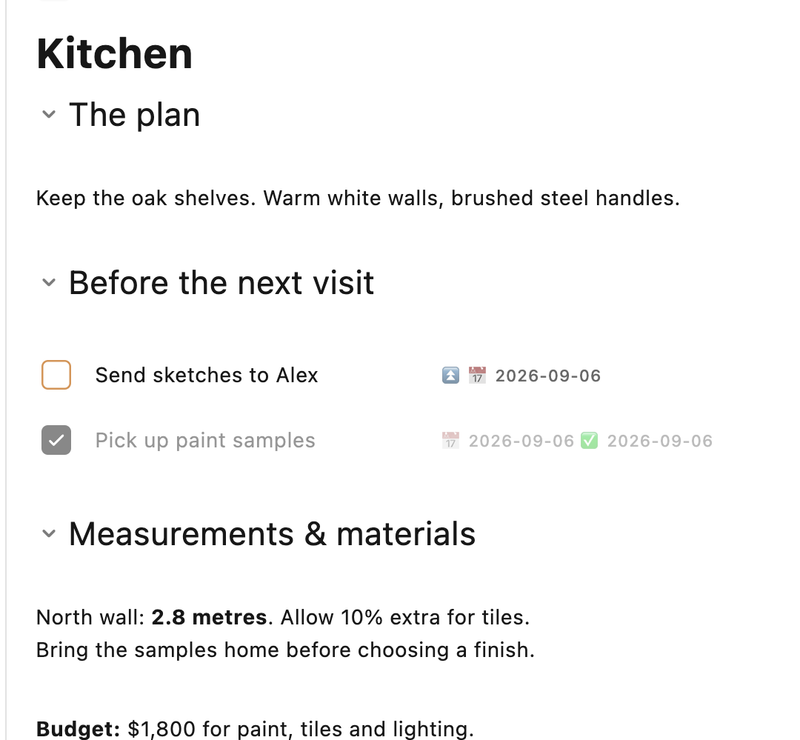
TaskForge offers full compatibility with the Obsidian Tasks plugin markdown format. Edit a task here and the markdown in your vault updates with it. No data migration needed - works with your current files.

  • Due dates, scheduled dates, start dates
  • Time-specific alerts with ⏰ notation
  • Priority levels with visual indicators
  • On completion actions (keep or delete)
  • Additional task statuses: In Progress [/], On Hold [!], Planned [>]
  • New daily notes use your Obsidian template with Templater support

Perfect for Obsidian power users who want mobile task management without disrupting their markdown-based workflow or migrating data.

TaskNotes Integration

TaskForge supports the TaskNotes format with one task per file using YAML frontmatter. Perfect for users who prefer detailed task documentation and structured metadata. Works alongside regular Obsidian Tasks.

  • One task per file with YAML frontmatter metadata
  • View and edit markdown body content with formatting toolbar
  • Flexible identification: by tag or custom property
  • Full support for status, priority, dates, tags, and recurrence
  • Choose between TaskNotes or inline tasks as default
  • Configurable default folder for new TaskNotes
  • TaskNotes and inline tasks appear together in every list

Ideal for users who prefer detailed task documentation with rich notes, attachments, and YAML metadata per task rather than inline markdown tasks.

Learn more →

Smart Notifications (Premium)

TaskForge provides custom notification times, due date alerts, overdue reminders, and calendar event reminders. Set multiple reminders per event. A smart budget system ensures your most important notifications always get delivered within iOS and Android limits.

  • Custom daily summary times with task and event overview
  • Due date and overdue task alerts
  • Calendar event reminders based on each event's reminder settings
  • Multiple reminders per event (e.g., 15 minutes before and 1 hour before)
  • Smart notification budget: prioritizes and schedules within OS limits automatically
  • Complete tasks directly from the notification banner
  • Configurable app badge count from any custom list
  • Snooze options: 10 minutes, 30 minutes, 1 hour, or until tomorrow

Perfect for busy professionals who need reliable reminders for both tasks and calendar events without constantly checking the app.

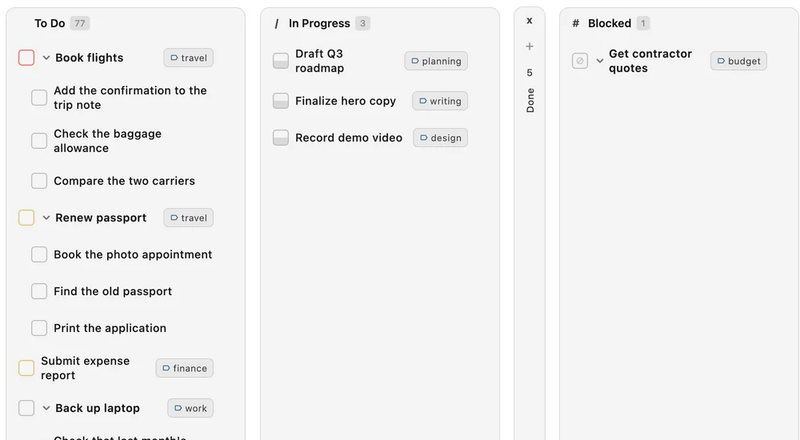
Dynamic Kanban Boards

Dynamic Kanban Boards

TaskForge lets you turn any custom list into a Kanban board with drag-and-drop column reordering. Visualize your workflow with collapsible columns, customizable cards, and persistent layouts. Perfect for project management, sprint planning, and visual task organization.

  • Drag-and-drop column reordering for custom workflows
  • Group by ANY property: status, priority, tags, due date, file
  • Collapsible columns to focus on active work
  • Visual task cards with all your task properties
  • Column order and collapsed states saved per board
  • Responsive design that works beautifully on all devices

Perfect for visual thinkers, project managers, and anyone using agile workflows who want to see task status and progress at a glance.

Calendar View

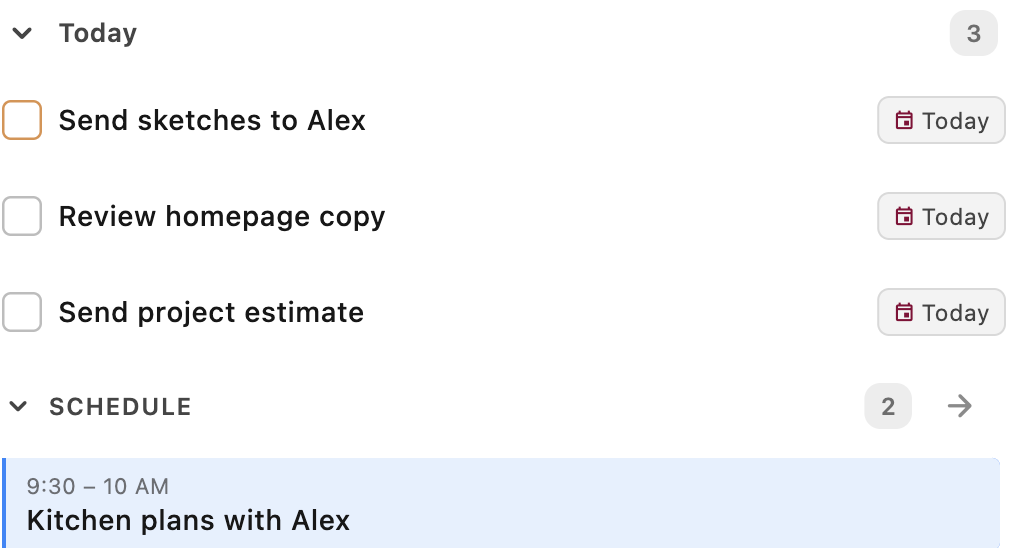
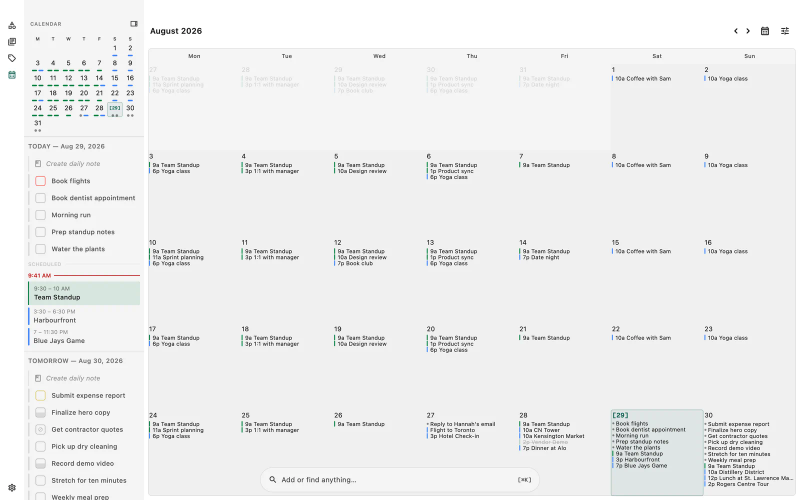
TaskForge features a full calendar with Day, Week, and Month views. See your tasks and native calendar events side by side in one unified view. Day view shows a 24-hour time grid with task and event blocks. Week view handles overlapping items across responsive columns (3 on phone, 7 on desktop). Month view supports infinite scrolling with dot indicators and multi-day event bars. Create events by dragging across time slots on desktop, use time blocking with task durations, and peek at any task or event without leaving the calendar. 10 keyboard shortcuts on macOS for fast navigation.

  • Three views: Day (24-hour grid), Week (responsive columns), and Month (infinite scroll)
  • Native calendar event integration with tasks in one unified view (Premium)
  • Time blocking: tasks with durations render as visual blocks on the time grid
  • Create events by dragging across time slots on desktop
  • Task Peek: tap any task or event to view and edit without navigating away
  • Collapsible panel with drag handle on mobile, togglable sidebar on desktop
  • Live now-line indicator and today highlighting in all views
  • 7 filter dimensions: calendars, lists, date types, statuses, overdue, pending, declined
  • Works with Apple Calendar, Google Calendar, Outlook, and any provider that syncs to your device
  • 10 keyboard shortcuts on macOS for views, navigation, and event creation

Essential for professionals who need to visualize their schedule, plan their day with time blocking, and manage both tasks and calendar events from one screen.

Task Peek

Tap any task to open a floating preview with full editing capabilities. Change the title, status, priority, dates, tags, and description without navigating away from your list or calendar. Changes save automatically. Navigate between tasks with arrow keys on desktop. Swipe down to dismiss. Works for both tasks and calendar events.

  • Tap any task to open an inline editor overlay
  • Edit title, status, priority, dates, duration, tags, and description
  • Auto-save with 500ms debounce for text, instant save for selections
  • Navigate between tasks with arrow keys or J/K on desktop
  • Cancel button reverts all changes to the original state
  • Event peek shows RSVP, location, attendees, and conference links
  • Responsive sizing: 440px on desktop, 85% on tablet, 95% on phone

Perfect for quickly reviewing and updating tasks during planning sessions or daily reviews without losing your place in a list or calendar view.

Advanced Organization

TaskForge lets you create unlimited custom task lists with advanced filtering using AND/OR logic. Browse tags, contexts, and projects from the new Organize tabs, or tap any chip on a task to jump straight to a filtered view. Find leaf tasks, blocking tasks, parent/subtask state, and reverse dependencies in seconds with new relationship and dependency operators. Multi-level sorting, visual grouping, and powerful global text search across all tasks.

  • Browse-by-metadata: Organize tabs for Tags, Contexts, and Projects with usage counts and search
  • Tap any tag, context, or project chip on a task to instantly filter the whole vault
  • Relationship filters: Has no subtasks (leaves), All subtasks complete, Any subtask open, Parent is complete, Parent is open
  • Reverse dependency filters: Is blocking, Has dependents, and their inverses to surface high-leverage work
  • Advanced filtering with AND/OR logic
  • Dual tag filtering: exact match + partial text search
  • Tag picker for easy selection from existing tags
  • Multi-level sorting and visual grouping
  • Task title filtering with multiple operators
  • Description filtering: has/doesn't have description, text search within descriptions
  • Collapsible group sections for better focus

Ideal for GTD practitioners and power users who need advanced filtering, custom views, and precise control over their task lists.

Rich Task Properties

TaskForge provides complete task lifecycle management with hierarchical tags, emoji support, subtasks, dependencies, and markdown support. Obsidian internal links work directly in task titles.

  • Hierarchical tags (project/alpha) with emoji support (#🚀goal)
  • Subtask support with visual indentation
  • Task dependencies with automatic blocked status management
  • Obsidian internal link support ([[page]] or [[page|text]])
  • Markdown support in titles and descriptions

Great for teams and individuals who need granular task organization with nested tags, subtasks, and cross-linked notes within their knowledge base.

Cross-Platform Native Apps

TaskForge delivers native apps for iPhone, iPad, macOS, and Android. Universal purchase works across iOS, iPadOS, and macOS with a consistent experience on every device. Fully interactive home screen widgets are available on all platforms.

  • Universal purchase across iOS, iPadOS, and macOS
  • Android support with platform-native features
  • Fully interactive widgets: task lists and calendar widgets with event + task views
  • Native macOS menu bar integration with keyboard shortcuts

Essential for users who work across multiple devices and need their tasks accessible everywhere - from iPhone on the go to Mac at the desk.

Smart Recurrence

TaskForge supports flexible recurring tasks with daily, weekly, monthly, and yearly patterns. Create recurring task series with specific counts (repeat 5 times) or end dates. Progress tracking and smart series management.

  • Multiple recurrence patterns
  • Recurring task series with progress tracking
  • Completion-based or date-based recurrence
  • Custom intervals and scheduling options

Essential for anyone with routine tasks - daily reviews, weekly reports, monthly goals - who wants automatic task regeneration.

Filename as Scheduled Date

Tasks in your daily notes automatically get the file's date as their scheduled date, no need to manually add dates to every task. If your daily note is named 2024-03-19.md, all dateless tasks inside it are scheduled for March 19th. Inferred dates are runtime-only, so your markdown files stay clean. Compatible with the Obsidian Tasks plugin's "Use Filename as Default Date" feature.

  • Works with your configured daily note format (YYYY-MM-DD, YYYYMMDD, and more)
  • Inferred dates are runtime-only, your markdown files stay untouched
  • Adding any explicit date (due, scheduled, or start) overrides the inference
  • Add a scheduled time and duration to tasks with inferred dates
  • Works everywhere: task lists, calendar, filters, sorting, grouping, and widgets
  • Syncs across devices via iCloud

Perfect for daily note users who want tasks to inherit their note's date automatically without cluttering each task with explicit date fields.

Inherit Tags from Frontmatter

Inline tasks automatically inherit tags from their file's YAML frontmatter. If a file has tags: [work, project-x] in its frontmatter, every inline task in that file shows those tags without you adding them to each task line. Inherited tags are display-only and never written back to your files. Compatible with the Obsidian Tasks plugin.

  • Tags read from the YAML frontmatter tags field automatically
  • Supports all common formats: inline lists, block lists, single values, and comma-separated
  • Inherited tags appear in task lists, filters, detail views, and widgets
  • Display-only: inherited tags are never written back to your markdown files
  • Case-insensitive deduplication with the task's own tags
  • Zero overhead when disabled, cached per-file when enabled
  • Syncs across devices via iCloud

Perfect for users who organize files by project or context using frontmatter tags and want every task in that file to carry those tags automatically.

Share Sheet Integration

Share tasks and lists with other apps, or quickly capture content from Safari, Chrome, or any app into TaskForge. Tasks are created instantly, no need to open the app first.

  • Share tasks or entire lists to Messages, Email, Notes, and more
  • Capture URLs and text from any app as new tasks
  • Choose which list to save to right from the share sheet
  • Supports both inline tasks and TaskNotes formats
  • Tasks are enriched with smart parsing on next app launch

Quick Add with Natural Language

TaskForge lets you add tasks instantly from Control Center, Action Button, Quick Settings, or Siri. Type natural language like "meeting 2-4pm" and TaskForge extracts the time range and duration automatically. Switch to event mode to create calendar events. All parsing works in 18 languages.

  • Natural language time ranges: type "2-4pm" to set start time and 2-hour duration
  • Duration expressions: "90m", "1h30m", "for 2 hours" parsed automatically
  • Event mode: toggle to create calendar events with date, time, location, and calendar selection
  • Type "/" in event mode to pick a calendar from a dropdown
  • Named times: "noon" and "midnight" recognized as time values
  • All parsing localized in 18 languages, type in your native language
  • Add tasks from iOS Control Center, Action Button, or Lock Screen
  • Android Quick Settings tile for instant task capture

Voice Assistant

TaskForge's voice assistant integration lets you add tasks hands-free using Siri or Google Assistant. Just say your task and which list to add it to, no need to open the app.

  • "Hey Siri, add buy groceries in TaskForge"
  • "Hey Google, add call dentist to my work list on TaskForge"
  • Tasks appear in iOS Spotlight search
  • Siri learns from your usage and suggests task creation proactively

Frequently Asked Questions

Is TaskForge free to use?

Yes, TaskForge offers a free tier that includes core task management features. Premium features like widgets, notifications, and kanban boards are available with a one-time lifetime purchase of $39.99 or a monthly subscription of $1.99/month.

Does TaskForge work with the Obsidian Tasks plugin?

Yes, TaskForge is fully compatible with the Obsidian Tasks plugin format. It reads and writes tasks using the same markdown syntax, so you can move between Obsidian on desktop and TaskForge on mobile with no conversion step.

What platforms does TaskForge support?

TaskForge is available on iPhone, iPad, Mac, and Android. It syncs with your Obsidian vault across all devices, so your tasks stay up to date everywhere.

Does TaskForge support widgets?

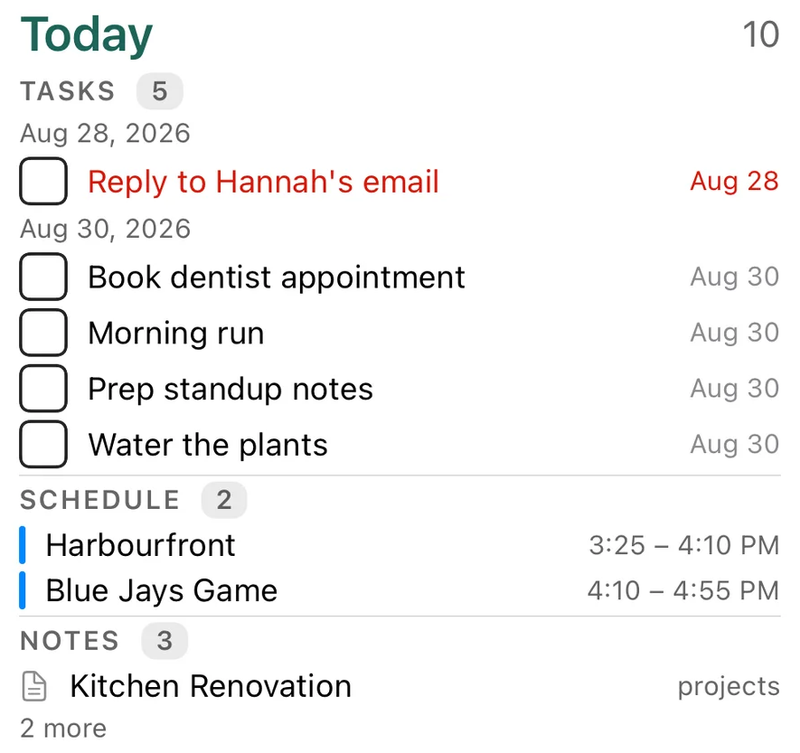
Yes, TaskForge offers interactive home screen widgets on iPhone, iPad, Mac, and Android. Task list widgets let you view and complete tasks directly from your home screen. Calendar widgets show your events and tasks together with Up Next, Daily Agenda, Month View, and Month + Agenda layouts. You can complete tasks, navigate months, and select days without opening the app.

How does TaskForge sync with Obsidian?

TaskForge reads directly from your Obsidian vault files. It supports iCloud sync on Apple devices and file-based sync on Android. Your tasks are stored as standard markdown files in your vault.

Does TaskForge support kanban boards?

Yes, TaskForge includes a kanban board view where you can organize tasks into columns, drag and drop between statuses, and visualize your workflow. It works with your existing Obsidian task data.

How do I browse all tasks with a specific tag, context, or project?

Tap any chip on any task to instantly filter your whole vault by that label. Tap '#urgent' on one task and you see every urgent task across every list. You can also open the Organize screen and switch to the Tags, Contexts, or Projects tab to see a searchable, sortable index of every value with usage counts. The search overlay also shows a chip strip with your most-used metadata for one-tap browsing. Save any filtered view as a custom list to return to it instantly.

Can I filter tasks that are blocking other work, or find leaf tasks with no subtasks?

Yes. The Relationships filter now includes 'Has no subtasks' (leaves you can act on directly), 'All subtasks complete' (parents ready to close), 'Any subtask open' (parents still in progress), 'Parent is complete' (orphan subtasks left behind after a project shipped), and 'Parent is open'. The Dependencies filter adds 'Is blocking' (open tasks others depend on, usually your highest-leverage work), 'Has dependents', and their inverses for low-coordination filters. These operators are true/false checks based on the relationships TaskForge already knows about, so they compose with status, dates, tags, and any other condition.

Ready to take your tasks everywhere?

Join 20,000+ Obsidian users who manage their tasks with TaskForge.